Friday, July 1, 2011

Google+, Senjata Terbaru (Lagi) Google Melawan Facebook

0 comments

Google baru saja meluncurkan Google+ (Google Plus), yang merupakan layanan jejaring sosial baru. Layanan tersebut (lagi-lagi) diyakini bakal menjadi pesaing kuat bagi rival raja situs jejaring sosial Facebook. Sebelumnya, Google beberapa kali sudah berusaha menantang Facebook dengan membuat Google Buzz, Orkut, dan Google Wave. Sayapun selalu membuat akun di setiap layanan Google tersebut tetapi semua situs jejaring sosial buatan Google itu gagal meraih sukses. Kini Google menantang Facebook lagi dengan Google+ dengan alamat htttp://plus.google.com. Apakah kali ini Google akan mengalami nasib yang sama? Terkapar saat menghadapi Facebook?

Peluncuran Google+ ini menjadi pertaruhan Google untuk masuk ke pertarungan jejaring sosial. New York Times menulis Google+ sepertinya terlambat masuk ke kancah ini. Menurut datacomScore, pada Mei tahun ini, sebanyak 180 juta orang mengunjungi situs Google termasuk YouTube. Angka ini memang lebih besar dari Facebook yang dikunjungi 157,2 juta orang. Namun, para Facebooker rata-rata menghabiskan waktu 375 menit. Adapun pengunjung Google hanya menghabiskan waktu 231 menit.

Apa dan Bagaimana Google Plus itu? Mari kita bahas bersama, jejaring sosial milik Google ini membuka ruang bagi para penggunanya untuk membagi foto, pesan, dan komentar seperti layaknya di Facebook. Google juga menambahkan layanan peta dan images dalam Google+ ini. Google pun mengklaim, jejaring sosialnya ini akan memudahkan orang untuk mengatur kontak tanpa membuat grup.

Dengan produk anyarnya ini, Google tak mau gagal lagi. Manajemen menawarkan fitur-fitur yang menjadi andalan mereka yaitu:
  • Circles. Google menyebutnya Circles. Pada dasarnya ini adalah pengelompokan kontak berdasarkan kategori tertentu. Anda tetap bisa berbagi namun di saat yang sama Anda juga bisa mengendalikan pada siapa saja Anda akan sharing. Cara kerjanya intuitif. Anda tinggal drag and drop tiap nama ke dalam Circles yang Anda buat. Proses ini bisa berlaku sebaliknya juga. Anda bisa dengan mudah memindahkan contact Anda ke 'lingkaran' yang lain. Pada masing-masing Circles ada label jumlah penghuni dan yang menarik, saat Anda memindahkan contact ke Circles yang lain akan ada animasi yang tak hanya cantik tapi juga informatif.

  • Hangouts. Yang ini sebenarnya adalah fitur chat. Bedanya, yang ini menggunakan fitur video. Cara kerjanya pun dibalik. Kalau biasanya Anda 'mengundang' orang untuk video chat, Hangouts ini justru sebaliknya. Anda tinggal klik start a hangout dan Anda masuk ke chatroom kosong. Di saat yang sama sebuah pesan berisi info kalau Anda sedang 'hangout' akan terkirim ke semua lingkaran sosial Anda. Dengan begitu, siapa yang berminat bisa langsung bergabung. Hangouts ini bisa menampung sepuluh orang sekaligus dan kalau masih ada yang berminat, mereka bisa antre sampai salah satu peserta ada yang memutuskan keluar. Lalu kalau ada sepuluh orang dalam satu chatroom, bagaimana Google membagi ruang buat mereka. Sederhana, siapa yang sedang berbicara akan otomatis masuk ke chat screen. Saat ada orang lain yang berbicara, otomatis layar utama akan digantikan orang yang sedang berbicara. Siapa yang bicara lebih lantang, dia yang akan menghuni layar utama.

  • Instant Upload. Ini tempat sharing foto. Prosesnya juga tak rumit. Yang perlu Anda lakukan hanyalah mengambil gambar yang Anda inginkan dan secara otomatis gambar atau bahkan video yang Anda rekam akan disimpan di Google+. Koleksi gambar dan video ini akan bertahan di sana dalam kondisi private sampai Anda memutuskan akan 'share' dengan siapa.
  • Sparks. Sparks ini sebenarnya adalah koleksi artikel, video, gambar atau konten lain yang dikelompokkan berdasarkan interest. Data ini bergantung pada fitur Google yang lain seperti Google Search. Misalnya saja Anda mencari dengan kata kunci Movie, Sparks akan menampilkan semua konten yang masuk dalam kategori ini. Anda bisa menambahkan interest ini dan untuk selanjutnya Anda tinggal klik kata kunci yang sudah berjajar di sebelah kiri. Ini bukan search engine karena di saat yang sama Anda juga bisa berbagi informasi ke rekan-rekan Anda yang ada di dalam Circles tadi.
  • Huddle. Pada dasarnya Huddle ini adalah group chat. Anda bisa berdiskusi seperti saat Anda menggunakan fitur conference pada Yahoo! Messenger. Sepertinya ini adalah fitur GTalk yang diintegrasikan dalam Google+. Yang pasti, Google+ ini bakal tersedia untuk pengguna Android meskipun untuk pengguna smartphone dengan sistem operasi lain masih harus bersabar menunggu. Bosan dengan fitur yang ditawarkan Facebook dan Twitter? Kenapa tidak mencoba mengenali dulu cara kerja Google+. Siapa tahu Anda mendapat invitation untuk bergabung.

  • Mobile. Akses Google+ bisa dilakukan dari mana saja via ponsel kita. Di dalamnya ada fitur-fitur seperti instant upload, membuat rencana grup, multiple conversation, dan sebagainya.


Melihat fitur-fitur diatas, saya bisa mengambil kesimpulan bahwa layanan Google+ ini hanya merupakan produk ulang dari Facebook dengan ditambahkan beberapa fitur dengan sedikit impromivasi seperti VideoChat. Menarik melihat senjata baru ini dalam betarung melawan Facebook, mengingat Google+ yang baru meluncurkan versi percobaannya yang sekarang baru bisa dinikmati oleh sebagian orang saja. Kita tunggu versi full dari Google+ ini, apakah senjata ini mampu membunuh raksasa jejaring sosial saat ini, Facebook? Hanya waktu yang bisa menjawabnya, yang jelas kita, sebagai konsumen akan diuntungkan dengan persaingan layanan seperti ini.. Welcome in Google+.

Layanan Baru Google: "What Do You Love"

0 comments

Google diam-diam meluncurkan layanan baru misterius yang disebut What Do You Love (Apa yang Anda Sukai) dengan alamat www.wdyl.com. Sepertinya ini akan menjadi sebuah penggabungan antara hasil pencarian seluruh produk dan semua layanan Google yang dibundel menjadi satu. 

Layanan What Do You Love ini berupa kotak pencarian sederhana, mirip dengan yang ada di homepage Google, tapi menyajikan hasil pencarian dari lebih dari 20 layanan Google yang berbeda, termasuk Google Translate, Trends, YouTube, Maps dan Grups. Hasilnya disajikan dalam kotak kecil yang dapat, dalam beberapa kasus, diperluas dengan mengklik ikon di sudut kanan bawah. Jika Anda membutuhkan hasil yang lebih, Anda dapat mengklik tombol di sudut kanan atas dari kotak dan langsung ke layanan yang dipilih.

Konsep What Do You Love ini mengingatkan kita pada iGoogle, sebuah layanan yang memungkinkan Anda menambahkan aplikasi sederhana ke portal pribadi Anda sendiri. Yang membedakannya What Do You Love langsung menciptakan sebuah mini-portal tentang segala istilah yang Anda pilih, yang membuatnya menjadi pilihan bagus untuk pengguna yang tidak memiliki waktu untuk bermain-main dengan pilihan dan hanya ingin memiliki akses langsung ke banyak layanan Google pada satu halaman.

Layanan, terletak di alamat www.wdyl.com dan google.com/whatdoyoulove, beruang tanda hak cipta Google, tetapi penjelasan yang sangat sedikit, dan belum dijelaskan terlalu rinci apa sebenarnya tujuan Google meluncurkan situs baru ini. Belum ada pernyataan resmi. Layanan ini muncul hampir bebarengan dengan Google+ yang ditujukan sebagai layanan jejaring sosial baru yang disebut-sebut akan bersaing dengan Facebook.

Apapun itu, layanan ini jika terus dilanjutkan tentu saja akan sangat memanjakan pengguna internet karena hampir semua layanan Google berada dalam satu halaman. Selama ini layanan Google terpisah satu dengan yang lainnya. Misalnya jika ingin mencari gambar harus mengklik dulu tab Gambar di mesin pencari Google. Demikian juga dengan Peta dan banyak layanan Google lainnya. Artinya fokus layanan Google ke pengguna dengan adanya Google What Do You Love ini benar-benar diimplementasikan dengan baik. Sekali lagi hal ini akan membuat Google selangkah lebih maju dan  membuat para pesaing Google untuk siap-siap tertinggal lebih jauh lagi.


Saturday, May 14, 2011

Get More Followers With Twidium

0 comments

Twidium is clever Twitter software which is used to increase the twitter account followers (Get More Followers). This is a Twitter client product from Twidium.com which uses the mass following technique and has a 4 stars Softsea rating as well. The Twidium will send request to some specific Twitter accounts and the request will make those specific users to follow the tweets and makes traffic to the website.

Twidium Get More Followers Tool is a solution for optimizing your Twitter account by increasing the number of followers you have. It uses mass following by sending out following requests to specific accounts. By sending these requests to various theme accounts, more accounts will start to follow you, bringing you more attention and, ultimately, traffic to your website. 


Using this software, if another account does not start to follow your own, you can automatically stop following it after two days. While mass following can be controversial in the world of social networking, Twidium uses a specific method of clever following. The application does not spam other people's accounts, but only targets the specific theme accounts. This means that your account is far more likely to get genuinely interested followers, provided that you have something worthy to share. There are many parameters that you can set when you start using the software and it allows you to professionally and reliably to get more followers.

With the help of the Twidium software, if any account does not follow you then you can automatically stop following that particular account after two days. There are some steps to be followed for a huge increase in account followers:
  • Change the standard avatar to unique one
  • Change the account background
  • Fill the bio, Name and Location fields with as much information as you can.
  • How does Mass Following works
This is the process which has some basic and unique principles to follow and to start the mode one should select the Project-> Create New Project-> Mass following options. While you select the keywords, a list of accounts will be selected where these keywords appear.

While mass following became controversial in the world, Twidium uses unique and clever method of following. The program will analyze the selected accounts and compares them with the parameters and only if the account meets all parameters then the program will send the request.

If the account did not meet any one of the parameters then the program will skip that particular account to avoid spamming, so one should be very careful while setting the parameters. The software does not spam the other people’s account but selects the specific theme account to follow.

Features of Twidium:
The Twidium has several unique features which will help you to increase your account followers and some of the features are:
  • Clever Following: In this mass following mode the software will search the account with specific keywords and match them with the search criteria automatically. In this Twidium software you can use 7 different search criteria to search for the particular theme accounts. This tool follows the accounts which are genuine and not spam ones through the way it searches.
  • List Following: This software will select the account which matches the keywords and then choose search criteria for the automatic selection of accounts so that the program can follow it clearly.
  • Unfollowing: The Twidium Software will find the accounts which are not following you so the program automatically skips those accounts and unfollow them.
  • Proxy support: There is a fully automatic work with Proxy servers which helps to avoid Twitter limits.
  • Unlimited number of Accounts: There are options to work with other accounts when there are no limits on some accounts so you will not get locked out of the Twitter.
  • Save time: If you set up the project and start once then the program will do the entire operation on the project.
  • Get More Follower: Get more follower to your Twitter account as soon as possible!

If you are looking to enhance your social media power by using Twitter then Twidium is very much needed for you. I’ve used this program myself and can fully ensure you that this program helps a lot. I’ve tried this in my test Twitter account and it worked!

Let's download twidium and get full version to get more followers as much as possible with ease. For more information please click here

Sunday, May 23, 2010

CiteULike, Perpustakaan Ilmiah Online Gratis

1 comments


CiteULike adalah sebuah situs yang berisi layanan gratis untuk membantu penyimpanan, organisasi, dan penyebaran referansi paper ilmiah. Ketika seseorang melihat sebuah paper yang menarik di suatu halaman web, pengguna dapat menekan satu tombol dan catatan akan tersimpan dalam perpustakaan pribadinya. CiteULike secara otomatis mengekstrak detail pengutipan, sehingga pengguna tidak perlu mengetik lagi. Semuanya dilakukan dari web browser, sehingga tidak perlu menginstall software apapun. Karena semua berkas pustaka tersimpan di server, pengguna dapat mengaksesnya memakai komputer apapun yang terhubung ke internet. Di Situs ini terdapat hampir lebih dari 4 juta artikel ilmiah.

Halaman utama CiteULike akan menampilkan beberapa jurnal terbaru yang ditambahkan oleh penggunanya. Pengunjung (yang tidak mendaftar/login) dapat melihat detailnya dengan melakukan klik ke judul jurnal dimaksud. Apabila pengunjung tidak menemukan referensi jurnal yang dicari, pengunjung dapat melakukan pencarian jurnal atau referensi ilmiah melalui kotak pencarian yang ada di bagian kanan atas halaman web. Jika pengunjung menemui kesulitan atau tidak tahu cara melakukan pencarian, pengunjung dapat melihat bantuan pencarian CiteULike atau dari halaman pertanyaan yang sering diajukan / Frequently Asked Question (FAQ).

Untuk memaksimalkan pemakaian CiteULike, disarankan bagi pengunjung untuk berkontribusi dan mendaftarkan diri (daftar CiteULike di sini) dan untuk berkolaborasi meningkatkan koleksi artikel jurnal yang ada di CiteULike. Sampai dengan saat tulisan ini dibuat, ada 3,916,9664 artikel jurnal / referensi ilmiah yang terdapat di CiteULike, dan akan terus bertambah setiap harinya.

Link:


Thursday, April 29, 2010

Android, Sistem Operasi Seluler Dari Google

2 comments

Android adalah sistem operasi untuk telepon seluler yang berbasis Linux. Android menyediakan platform terbuka bagi para pengembang buat menciptakan aplikasi mereka sendiri untuk digunakan oleh bermacam peranti bergerak. Awalnya, Google Inc. membeli Android Inc., pendatang baru yang membuat peranti lunak untuk ponsel. Kemudian untuk mengembangkan Android, dibentuklah Open Handset Alliance, konsorsium dari 34 perusahaan peranti keras, peranti lunak, dan telekomunikasi, termasuk Google, HTC, Intel, Motorola, Qualcomm, T-Mobile, dan Nvidia.

Pada saat perilisan perdana Android, 5 November 2007, Android bersama Open Handset Alliance menyatakan mendukung pengembangan standar terbuka pada perangkat seluler. Di lain pihak, Google merilis kode–kode Android di bawah lisensi Apache, sebuah lisensi perangkat lunak dan standar terbuka perangkat seluler.

Di dunia ini terdapat dua jenis distributor sistem operasi Android. Pertama yang mendapat dukungan penuh dari Google atau Google Mail Services (GMS) dan kedua adalah yang benar–benar bebas distribusinya tanpa dukungan langsung Google atau dikenal sebagai Open Handset Distribution (OHD).

Sejarah
  • Kerjasama dengan Android Inc.
Pada Juli 2000, Google bekerjasama dengan Android Inc., perusahaan yang berada di Palo Alto, California Amerika Serikat. Para pendiri Android Inc. bekerja pada Google, di antaranya Andy Rubi, Rich Miner, Nick Sears, dan Chris White. Saat itu banyak yang menganggap fungsi Android Inc. hanyalah sebagai perangkat lunak pada telepon seluler. Sejak saat itu muncul rumor bahwa Google hendak memasuki pasar telepon seluler. Di perusahaan Google, tim yang dipimpin Rubin bertugas mengembangkan program perangkat seluler yang didukung oleh kernel Linux. Hal ini menunjukkan indikasi bahwa Google sedang bersiap menghadapi persaingan dalam pasar telepon seluler.
  • 2007-2008: Produk awal
Sekitar September 2007 sebuah studi melaporkan bahwa Google mengajukan hak paten aplikasi telepon seluler (akhirnya Google mengenalkan Nexus One, salah satu jenis telepon pintar yang menggunakan Android pada sistem operasinya. Telepon seluler ini diproduksi oleh HTC Corporation dan tersedia di pasaran pada 5 Januari 2010).

Pada 9 Desember 2008, diumumkan anggota baru yang bergabung dalam program kerja Android ARM Holdings, Atheros Communications, diproduksi oleh Asustek Computer Inc, Garmin Ltd, Softbank, Sony Ericsson, Toshiba Corp, dan Vodafone Group Plc. Seiring pembentukan Open Handset Alliance, OHA mengumumkan produk perdana mereka, Android, perangkat mobile yang merupakan modifikasi kernel Linux 2.6. Sejak Android dirilis telah dilakukan berbagai pembaruan berupa perbaikan bug dan penambahan fitur baru.

Telepon pertama yang memakai sistem operasi Android adalah HTC Dream, yang dirilis pada 22 Oktober 2008. Pada penghujung tahun 2009 diperkirakan di dunia ini paling sedikit terdapat 18 jenis telepon seluler yang menggunakan Android.
  • Android versi 1.1
Pada 9 Maret 2009, Google merilis Android versi 1.1. Android versi ini dilengkapi dengan pembaruan estetis pada aplikasi, jam alarm, voice search (pencarian suara), pengiriman pesan dengan Gmail, dan pemberitahuan email.
  • Android versi 1.5 (Cupcake)
Pada pertengahan Mei 2009, Google kembali merilis telepon seluler dengan menggunakan Android dan SDK (Software Development Kit) dengan versi 1.5 (Cupcake). Terdapat beberapa pembaruan termasuk juga penambahan beberapa fitur dalam seluler versi ini yakni kemampuan merekam dan menonton video dengan modus kamera, mengunggah video ke Youtube dan gambar ke Picasa langsung dari telepon, dukungan Bluetooth A2DP, kemampuan terhubung secara otomatis ke headset Bluetooth, animasi layar, dan keyboard pada layar yang dapat disesuaikan dengan sistem.
  • Android versi 1.6 (Donut)
Donut (versi 1.6) dirilis pada September dengan menampilkan proses pencarian yang lebih baik dibanding sebelumnya, penggunaan baterai indikator dan kontrol applet VPN. Fitur lainnya adalah galeri yang memungkinkan pengguna untuk memilih foto yang akan dihapus; kamera, camcorder dan galeri yang dintegrasikan; CDMA / EVDO, 802.1x, VPN, Gestures, dan Text-to-speech engine; kemampuan dial kontak; teknologi text to change speech (tidak tersedia pada semua ponsel; pengadaan resolusi VWGA.
Android versi 2.0/2.1 (Eclair)

Pada 3 Desember 2009 kembali diluncurkan ponsel Android dengan versi 2.0/2.1 (Eclair), perubahan yang dilakukan adalah pengoptimalan hardware, peningkatan Google Maps 3.1.2, perubahan UI dengan browser baru dan dukungan HTML5, daftar kontak yang baru, dukungan flash untuk kamera 3,2 MP, digital Zoom, dan Bluetooth 2.1.

Untuk bergerak cepat dalam persaingan perangkat generasi berikut, Google melakukan investasi dengan mengadakan kompetisi aplikasi mobile terbaik (killer apps - aplikasi unggulan). Kompetisi ini berhadiah $25,000 bagi setiap pengembang aplikasi terpilih. Kompetisi diadakan selama dua tahap yang tiap tahapnya dipilih 50 aplikasi terbaik.

Dengan semakin berkembangnya dan semakin bertambahnya jumlah handset Android, semakin banyak pihak ketiga yang berminat untuk menyalurkan aplikasi mereka kepada sistem operasi Android. Aplikasi terkenal yang diubah ke dalam sistem operasi Android adalah Shazam, Backgrounds, dan WeatherBug. Sistem operasi Android dalam situs internet juga dianggap penting untuk menciptakan aplikasi Android asli, contohnya oleh MySpace dan Facebook.

Android memiliki berbagai keunggulan sebagai software yang memakai basis kode komputer yang bisa didistribusikan secara terbuka (open source) sehingga pengguna bisa membuat aplikasi baru di dalamnya. Android memiliki aplikasi native Google yang terintegrasi seperti pushmail Gmail, Google Maps, dan Google Calendar.

Para penggemar open source kemudian membangun komunitas yang membangun dan berbagi Android berbasis firmware dengan sejumlah penyesuaian dan fitur-fitur tambahan, seperti FLAC lossless audio dan kemampuan untuk menyimpan download aplikasi pada microSD card. Mereka sering memperbaharui paket-paket firmware dan menggabungkan elemen-elemen fungsi Android yang belum resmi diluncurkan dalam suatu carrier-sanction firmware.

Monday, April 26, 2010

Review of Alexa

2 comments


Alexa Internet, Inc. is a California based subsidiary company of Amazon.com that is known for its toolbar and website. Once installed, the toolbar collects data on browsing behavior which is transmitted to the website where it is stored and analyzed and is the basis for the company's web traffic reporting.

Operations and history
Alexa Internet was founded in 1996 by Brewster Kahle and Bruce Gilliat. The company's name was chosen in homage to the Library of Alexandria, drawing a parallel between the largest repository of knowledge in the ancient world to the potential of the Internet.

The company offered a toolbar that gave Internet users suggestions on where to go next, based on the traffic patterns of its user community. Alexa also offered context for each site visited: to whom it was registered, how many pages it had, how many other sites pointed to it, and how frequently it was updated.

Alexa's operation includes archiving of webpages as they are crawled. This database served as the basis for the creation of the Internet Archive accessible through the Wayback Machine. In 1998 the company donated a copy of the archive, 2 terabytes back then, to the Library of Congress. Alexa continues to supply the Internet Archive with web crawlers.

In 1999, Alexa was acquired by Amazon.com for about $250 million in Amazon stock as the company moved away from its original vision of providing an 'intelligent' search engine. Alexa began a partnership with Google in spring 2002, and with the Open Directory Project in January 2003. In May 2006, Amazon replaced Google with Live Search as a provider of search results. In September 2006, they began using their own Search Platform (clarification needed) to serve results. In December 2006, they released Alexa Image Search. Built in-house, it is the first major application to be built on their Web Platform.

In December 2005, Alexa opened its extensive search index and web-crawling facilities to third party programs through a comprehensive set of web services and APIs. These could be used, for instance, to construct vertical search engines that could run on Alexa's own servers or elsewhere. In May 2007, Alexa changed their API to require comparisons be limited to 3 sites, reduced size embedded graphs be shown using Flash, and mandatory embedded BritePic ads.

In April 2007, the lawsuit Alexa v. Hornbaker was filled to stop trademark infringement by the statsaholic service.  In the lawsuit, Alexa alleges that Hornbaker is stealing traffic graphs for profit, and that the primary purpose of his site is to display graphs that are generated by Alexa's servers. Hornbaker removed the term Alexa from his service name on March 19, 2007. Nevertheless, Alexa expressly grants permission to refer its data in third-party work subject to suitable credits.
On November 27, 2008, Amazon announced that Alexa Web Search was no longer accepting new customers, and the service would be deprecated or discontinued for existing customers on January 26, 2009.

Accuracy of ranking by the Alexa Toolbar
Main article: Alexa Toolbar
Alexa ranks sites based on tracking information of users of its Alexa Toolbar for Internet Explorer and from integrated sidebars in Mozilla and Netscape.
There is some controversy over how representative Alexa's user base is of typical Internet behavior, especially for less trafficked sites. In 2007 Michael Arrington provided a few examples of relative Alexa ranking known to contradict data from comScore, including ranking YouTube ahead of Google.
On April 16, 2008, many users reported dramatic shifts in their Alexa rankings. Alexa confirmed this later in the day with an announcement that they had released the new Alexa ranking system, claiming that they now take into account more data sources "beyond Alexa Toolbar users".

Redesign and new statistics
On March 31, 2009, Alexa.com underwent a complete redesign with new metrics including: Pageviews per User, Bounce Rate, and Time on Site. In the following weeks they added new features including Demographics, Clickstream and Search Traffic stats. These new features were introduced in order to compete with other services such as Compete.com and Quancast.

Spyware
The Alexa toolbar is regarded by many vendors, such as Symantec and McAfee, as spyware. Symantec classifies the toolbar as trackware. McAfee classifies it as Adware, a "Potentially Unwanted Program." McAfee Site Advisor rates the Alexa website as yellow, with the warning:
"In our tests, we found downloads on this site that some people consider adware, spyware or other potentially unwanted programs".


Alexa Internet, Inc.
TypeSubsidiary
Founded1996[1]
HeadquartersSan Francisco, California, USA
IndustryInternet information providers
ProductsSearch Engine
WebsiteAlexa.com
Type of siteWeb traffic and ranking
AdvertisingWeb banner with AdBrite
RegistrationN/A
Available inEnglish
Current statusActive

Software Tabel Periodik Unsur Kimia

0 comments

Sistem tabel periodik unsur merupakan suatu sistem pengelompokkan unsur yang berdasarkan pada sifat fisis dan kimia yang diurutkan menurut kenaikan nomor atom. Melalui pelajaran Kimia di sekolah tingkat menengah, unsur – unsur mulai diperkenalkan baik lambang atom, nama unsur, nomor atom, massa atom relatif, dan lain-lain.  Pengenalan unsur ini merupakan dasar dari penguasaan materi Kimia sebelum menginjak pada topik materi kimia yang lebih kompleks lagi.

Sekarang sudah tersedia software tentang tabel periodik unsur yang dikembangkan oleh Paul Alan Freshney dengan alamat website www.freshney.org. Software tersebut dengan titel Periodic Table Classic yang memuat berbagai data unsur seperti data fisis maupun kimia, sejarah penemuan, penamaan unsur, sumber mineral, kegunaan, gambar unsur, dan sebagainya. Untuk memudahkan siswa mempelajari konfigurasi elektron, bilangan kuantum, jari atom, dan jumlah elektron masing-masing kulit juga tersedia di software ini. Kita tinggal klik salah satu unsur yang diinginkan pada tabel periodik, maka akan muncul data yang berkaitan dengan unsur tersebut.

Software tabel periodik ini dapat diunduh secara gratis dari alamat website http://www.freshney.org lalu install pada komputer. Penggunaan software ini hanya untuk kebutuhan pendidikan saja.

Diharapkan para pelajar dan pendidik yang menekuni kimia dapat dengan mudah mempelajari dan mengembangkan kimia untuk kehidupan.

Sunday, November 1, 2009

Blog For My Readers, Not For Google

1 comments

A lot of Search Engine Marketing “Experts” will say that a blog is perfect for getting those much-needed keywords onto your website that will help you rank higher and better in search engine organic results. The problem with that is, search engines aren’t actually “reading” your content. They are simply scanning it. And eventually, when you have an actual real person that visits your website, they will read your “content” and realize what a hack you are. They will not pass your content on nor will they visit your website again. This means that all the effort and time you spent writing blog entires stuffed with keywords and anchor text that had nothing important to say may have gotten visitors to your website, but it didn’t keep them there. It didn’t help push people to spread what you have to say via Twitter, Facebook, or email.

When it comes down to it, writing thoughtful, well-written blog entries are the best way to attract steady, relevant users to your website. Sure, they may not have all the “desired” search terms or keywords that you’re hoping to rank for, but it WILL show visitors and potential customers your expertise and make them interested in what you have to say.

In many ways, it’s harder to write for the search engines than it is for real people. Trying to fit in the word “costume” when only “costumes” seems to make sense can be a real challenge and lead to awkward sentences that will repel readers. Writing out your natural thoughts about a subject and teaching others what you have to say seems to roll off the tongue (or off the fingers, in computer-speak) much easier than any well-structured search engine blog post ever could.

Friday, September 25, 2009

Review Kelebihan dan Kelemahan Domain CO.CC dengan Blogspot

1 comments

Co.cc dan blogspot.com sama-sama domain gratis, tapi jika dibandingkan dengan blogspot.com, co.cc mempunyai banyak kelemahan.pada kesempatan kali ini saya akan membahas tentang kelemahan dan kelebihan co.cc dibandingkan blogspot.com. Bagaimanapun juga domain sangat berpengaruh pada maju mundurnya blog anda apalagi jika blog anda termasuk blog bisnis online.


Kita mulai dari kelebihan domain co.cc jika dibandingkan dengan blogspot.com,kelebihan domain co.cc dibandingkan dengan blogspot.com adalah lebih ringkas dan lebih mudah diingat.

Kalau kelemahannya adalah;
1. Domain co.cc lebih sering trouble
2. Jika situs/blog bisnis online anda sudah terkenal dan ramai pengunjungnya maka domain co.cc anda akan diembat dan dijual oleh pihak co.cc.anda tentu tidak mau kan domain anda yang telah dikenal luas gara-gara kerja keras anda tiba-tiba diambil?!
3. Ranking alexa yang tidak benar karena alexa menilik dari induknya co.cc bukan pada domain gratisannya (subdomainnya). Tetapi itu dulu, sekarang subdomainnya telah ditilik oleh alexa atau istilah kerennya subdomain co.cc memiliki ranking alexa independen alias berdiri sendiri sehingga ranking alexa murni pada subdomainnya bukan pada induknya.
4. Domain gratisnya hanya 1 tahun (nothing is free in this world)
5. Domain co.cc lebih lemot dibandingkan blogspot jika diakses dari indonesia.

Jadi saran saya, gunakanlah domain blogspot.com saja jika anda ingin menggunakan domain gratisan, karena domain co.cc memiliki 5 kelemahan yang fatal tersebut. Tapi jika anda ingin domain yang pendek lebih baik gunakan domain .com atau .net cman sekitar 100 rb saja kok. kalau pengen yang lebih murah lagi gunakanlah domain web.id

Berbagai sumber

Thursday, September 24, 2009

Blog Contest: Win up to $200 From DrShopper.com

0 comments

DrShopper.com is running a “Post and Win Contest” in which they will give out several different prizes to the users of DrShopper.com. Some of the prizes are: $100 Amazon gift card, $50 Amazon gift card, (2) $25 Amazon gift cards. All you have to do is register at DrShopper.com and you will be entered to win. The contest ends October 19th 2009.

Register & Join This Blog Contest, Just Click This Picture Below : 


Socint Review, Get Money With Social Site Like Facebook

0 comments

Socints is a new social networking site that allows you to meet people and be social, and in return you earn points that you can use to buy rewards. Here is my review.

Term Socint = Member

How it all works
The site lets you sign up and interact with other members. As you socialize you earn points. Here are the activities you can do on the site as well as the allocation of points: Sign In (5 points), Update Status (3 points), Update Mood (2 points), Message a Socint (5 points), Profile Comment (5 points), ChatRoom (5 points), Topics (3 points), Topics Comment (2 points),Groups(3 points),Groups Comment(2 points), Polls(3 points), Polls Comment (2 points), Rate (3 points), Rate Comment (2 points), MyLife (3 points), MyLife Comment (2 points), Event Comment (3 points). This gives you a grand total of 53 points per day. Other ways to make points are to upload a special profile picture featuring yourself with your username and Socints website name. It can not be edited in (5 points), and the refer people to the site (100 points).There is no tiered referral system.

The Rewards
There are 2 types of rewards, Raffle and Purchase. You can use your points to buy raffle tickets or you can just purchase the reward. The rewards consist of: 2000 socint points, $10 credit to PayPal, 4GB Apple Ipod Shuffle, 8GB Apple Ipod nano, $50 credit to PayPal account, or $10 credit to Alert Pay account. Not bad. The prices are different depending on whether or not you are purchasing a raffle ticket of buying the reward. Point cost ranges from 150 points to 7500 points.

My Rating
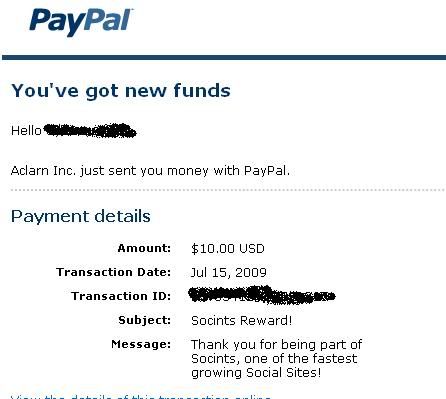
The site is small, and is still growing. I think that their needs to be more rules edited onto the site so that spamming is cut down. I wish that there was a forum board, as right now there is only a live chat option. To get a $10 cash payout to your paypal you have to have 7500 points. (7500/53points per day= 142 days) Now you can also refer people, but you would have to refer at least 75 people to earn $10. I think that as the site grows, it may be possible to earn points faster. I do not believe it is a scam, here is a picture of payment from Socint (not myself)

Overall, I feel that if you like social websites, if you have the time each day to accumulate the points (10 mins), or have friends that you could refer to earn points, it can be somewhat beneficial. My final rating is that it is harmless. Below is a link to the site, If you join, don't forget to add me as a friend (username: shevaix)

Join & Make Socint Account, Just Click Picture Below:


Saturday, September 12, 2009

Blog Can Still Drive Big Traffic

0 comments

You would almost think blogging was dead, the way headlines are dominated by Twitter, Facebook, and social media in general. I've always considered blogging to be a part of social media anyway, as the commenting factor lends to engagement between author and user.

But blogging is so five years ago right? It's all about microblogging and status updates now isn't it? If you think that's the case, think again, because blogs can still drive big-time traffic to websites. An example of this has been illustrated by the launch of e-commerce site Alice.com.

How much traffic are you getting from blogs? Let us know.

If you are not familiar with Alice.com, it is a site where consumers can buy everyday household items like toothpaste, toilet paper, laundry detergent, diapers, etc., right from the manufacturers, rather than through middleman retailers. It launched in June, and by July it had doubled its traffic to 387,000 unique visitors, according to Compete.

Alice.com
Guess where the majority of that traffic came from. According to Compete, it came from word-of-mouth from blogs. In fact, its number one traffic source was Blogger.com. Not Twitter. Not Facebook. Not search. Although each of these no doubt played valuable roles as well., Blogger.com has been the biggest factor in driving traffic for this site, and from the looks of things, that traffic is showing no signs of slowing down.
Blogger accounted for 18% of Alice.com's referral traffic in July, and obviously there are plenty of blogs out there that aren't hosted at Blogger.com. On top of that, Compete says Alice's conversion rate jumped to 3.5%  in July as well.

Of course, you have to give bloggers something to talk about to get valuable blog traffic. It's no different than getting people to talk about you on social networks or through any other form of word-of-mouth marketing. It starts with your product. Clearly Alice.com, has something that many people find worth talking about.

"Anyone who has previously shopped online for household products knows that prices are generally higher (sometimes considerably) than those found in stores," Compete's Matt Pace says of Alice.com.  "By selling directly to consumers, manufacturers are able to price their products below those found on most online retailers and more competitively to those found in stores."

Clearly this is a void in the lives of consumers that Alice is attempting to fill. It's still early to tell if this site will remain a success. As long as it keeps the bloggers (consumers) happy, it could enjoy a long life. Because one thing to remember about word-of-mouth is that it works both ways. Reputations can quickly move in different directions online. So can traffic.

Sunday, August 30, 2009

Google vs. Microsoft

0 comments

In less than a week, Google announced an operating system to compete with Windows, while Microsoft announced that Office 10 will include free, online versions of its four most popular software programs — a shot at Google’s suite of web-based office applications.
And not more than a month and a half ago, Microsoft unveiled its new search engine Bing which it hopes will steal market share from Google and finally make it real money online.
From the news of it, it’s a full-blown tech battle, complete with behind-the-scenes machinations to sic government regulators on each other.
It is, however, not a death match — it’s more of an fight to see who will be the King of Technology, since both companies pull in their billions through completely different siphons and are unlikely to severely wound one another any time soon.
Google pulled in $22 billion in revenue in 2008, 97 percent of which came tiny text ads bought by the keyword and placed next to search results or on pages around the web. Google makes a negligible amount of money bundling its online apps for businesses, charging $50 a head annually — but mostly it just gives its online text editor, email and spreadsheet programs away.
By contrast, Microsoft sold $14.3 billion worth of Microsoft Word and PowerPoint and other business applications over the last nine months, making a profit of $9.3 billion. It made a further $16 billion in revenue in 2008 through sales of its operating systems, which range from XP installations on netbooks, to Vista, to Windows Mobile to its server software.
Google now plans its own range of operating systems, starting with Android, an open-source OS for small devices like smartphones, and Chrome OS, a browser-focused, open-source OS that will run on notebooks and desktops.
Clearly top executives at each company look over at the others’ pots of gold and dream of ways to steal them, or at least make it harder for the other guy to make money.
In fact, they even dislike each other enough to spend money to make the other one lose revenue — take for example, Microsoft’s behind-the-scenes campaign to scuttle last year’s proposed Google-Yahoo advertising deal or its ongoing attempts to derail the Google Book Search settlement.
But in reality, the competition is really about creating universes or ecosystems that it hopes consumers will want to live their technology lives inside. And it’s about ego — a fight to be recognized as the world’s most important technology company.
Microsoft would love for everyone in the world to be using its Internet Explorer browser to search through Bing to find a story from its MSN portal to email via Hotmail or Outlook to a friend. Add in a smartphone running Windows Mobile and an Xbox in the living room for the kids, and you have a Microsoft family. And though it is much joked about, Microsoft is the dominant platform for software developers of all types, whether they are making small business software, massive online role-playing games or photo-editing utilities.
Google’s ecosystem looks different. It starts with a Google Chrome browser (oddly running only on Windows) with a default homepage set to Google News or a customized Google homepage. From there you might go to Gmail and then click on a Word document sent to you as an attachment which Google will quickly — and safely — open for you in its online word processor.
But most importantly, Google wants you to search and travel around the web, hitting web pages that run Google-served ads and Google tracking cookies. You might think that Google is a really cool company to give away all this free technology, while never thinking about the persistent and silent data collection Google is undertaking to profile you in order to deliver you to advertisers for a premium.
So How Do The Two Stack Up in Four Key Areas of Competition?
Browser market share as of May, 2009. Source: Net ApplicationsBrowsers:
Internet Explorer in all its variations still retains close to 70 percent of the market (depending on who is counting and how). That dominance remains, even though Microsoft’s latest offering IE8 lags behind all the other major browsers in features and advanced web capabilities.
Firefox, Opera, and Apple’s Safari have all driven browser innovation over the last five years, but most people have not been convinced to leave IE behind, despite other alternatives being safer and more advanced. Why does it matter? Well, IE installations come with a default home page, don’t they?
Google’s Chrome browser, on the other hand, is a handsome, whiz-kid of a browser. It’s sleek and nimble, and it revolutionizes how tabs are handled. The address bar is the search box (Google as default, naturally). Each website opened runs as its own browser instance and has very low permissions to read and write to files. The sandboxing of tabs means that if a single website hangs or crashes, the rest are unaffected. Meanwhile, lower permissions make it harder for a hacker to bust into your computer through your browser.
Chrome also has less than 2 percent of the browser market share.
Online Search: Google’s name now means search to most users. Google’s search engine means money to Google. In June, it delivered 78.5 percent of search results pages delivered to U.S. web users. In the first three months of 2009, Google pulled in $5.2 billion in revenue, a majority of which came from AdWords, an auction-based service that triggers ads based on the keywords in a search query.
Microsoft recently debuted Bing, a new search engine it hoped would fare well in comparison to Google. It’s got some fine innovations, and shows the company is thinking very hard about better ways to present information to users by finding ways to synthesize data, rather than just retrieving links. Still, despite these improvements, a $100 million ad campaign, and generous press coverage that treats Bing like an underdog, Bing gained only a point in June to get Microsoft 8.2 percent of all searches.
Operating Systems: Microsoft has been making operating systems since 1979 and has spent 28 years perfecting MS-DOS and Windows NT, the frameworks that Windows have been built around. Microsoft is estimated to run on about 90 percent of all laptops and desktops in the world. By copying its competitors’ best features, leveraging questionable licensing arrangements and using its base of accustomed users to buy it time against innovators, Microsoft has held on to its lead in the OS market for almost 30 years. That’s despite challenges from Digital Research, Apple and IBM.
Microsoft’s newest version, Windows 7, will be available in the fall. Early reviews say the OS boots quickly and sleeps fast, and avoids much of the confusing interface decisions that have made many dislike Vista, the successor to Windows XP. Microsoft also dominates in the business world, where nearly every medium to large company standardizes around Microsoft Office. Microsoft is also at work on version 6 of its operating system for handheld devices, which it first launched in 2000.
Its OS advantages are immense. It has millions of users who know nothing else and who like Windows. There are millions who are attached to games or the thousands of desktop apps that are only available on Windows. Thousands of devices just plug in and work on its hardware. And familiarity with Microsoft software is a requirement for a huge number of office jobs.
By contrast, Google first stepped into the OS game in 2007 when it announced its Android operating system for small devices. Google estimates that some 18 phone models will be running its system by the end of the year. Last week, Google announced, but did not show off, a new OS to compete with Windows, dubbing it Chrome OS.
That name signifies that Google’s OS will be for the web and browser-based. It hopes to convince developers to write software that runs inside a browser, instead of on top of the OS as developers for Windows and Apples’ OS X do. It will also let web developers extend the power of their websites by expanding the capabilities of the browser, allowing websites to lean on the browser for storage and processing help.
Advertising: Google is largely powered by its innovative auction-based text ads on its own site, but then expanded into serving ads on other people’s sites with the Adsense program. It bought the ad-serving and behavioral-profiling giant Doubleclick in 2007 for more than $3 billion, and has ventured into mobile, print, radio and television ads.
Microsoft has struggled to replicate Google’s online advertising success. Despite owning MSN.com — a portal that is second only to Yahoo as a destination — Microsoft has not made money on the internet. To turbocharge its ad delivery technology, it paid more than $6 billion in cash in 2007 for aQuantive, a full-service online advertising concern.
Instead, Microsoft’s online ad business lost $1.2 billion in 2008, double what it lost in 2007. The company expects 2009 revenues to be higher than the $3.2 billion it took in last year, but has not said it would make a profit.
Contrary to what some might have you believe, the benefits of the Google-Microsoft competition are immense.
Microsoft had largely grown complacent until Google came along to shake up categories. Gmail’s massive online storage capability and fancy programming made Microsoft hustle to upgrade its popular, though not user-friendly, web e-mail service. Google Maps led to Microsoft’s Live Maps, which now bests Google’s efforts in some ways.
Google has been winning the fight for the last few years, showing that it is still nimbler than the software giant from the Northwest. But the pendulum may be slowing, or even poised to swing the other way. With the innovations in Bing and the promise that Microsoft’s online Office offerings will be free and more fully featured than the Google equivalent, Microsoft is taking on Google where it matters for users: on the field of innovation.
And that will make for an interesting race, no matter which horse you prefer to ride.

Google - A Synonym for Everything

0 comments

The words Google and Internet have almost become synonymous in terms of modern web use.Google has become the pre-eminent Web search engine. In Feb. 1999 it moved from Alpha test version to Beta and officially launched Sept. 21, 1999. iGoogle formerly Google Personalized Homepage and Google IG, a service of Google with which you can add news, photos, weather, and stuff from across the web to your page.It is is a start page tool where you can aggregate all the Google resources you use on your online desktop. I played with Google Chrome yesterday. Pretty cool browser. But Google Chrome isn't for everyone, but if you are a web developer who needs to keep up with the bleeding edge of browser development. Google Wiki is a site for Google fans to share the latest news about Google and tips for using Google products. Google Video - One of the world's largest video sites ie., almost million videos, serving the best videos, funniest movies and clips. For the last several months, a large team of Googlers has been working on a secret project which is a next-generation architecture for Google's web search.Let's all expect lot more from google.

LCD vs Plasma

0 comments

There's much to get excited about with LCD's. LCD stands for Liquid Crystal Display and you may have discerning between plasma and LCD televisions. Mostly this would be the debated topic and a funny one. Plasma technology consist thousands of individual pixel cells, which allow electric pulses to excite rare natural gases - usually xenon and neon causing them to glow and produce light. This light illuminates the proper balance of red, green, or blue phosphors contained in each cell to display the proper color sequence from the light. LCD monitors reproduce colors through a process of subtraction ie., they block out particular colour wavelengths from the spectrum of white light until they are left with just the right color. And, it's the intensity of light permitted to pass through this liquid-crystal matrix that enables LCD televisions to display images with crystal clear quality. These LCD's also utilizes electrical chargers to twist and untwist the liquid crystals, which causes them to block light and, hence, emit blacks. Apart from these info, Average screen sizes range from 32 " to 63 " in Plasma and 13" to 65" in LCD. Plasma displays are fairly heavy, and may need additional supports to be mounted onto a wall where as LCD TVs weigh less than comparably sized plasma TVs and it can be easily mounted on a wall.


Wednesday, July 29, 2009

Pro Evolution Soccer 2010

0 comments

While the PC platform has seen less and less sports games released one genre of sports title embraces the PC is soccer (even EA will likely continue to release their FIFA games for the PC). Today Konami officially announced plans for Pro Evolution Soccer 2010 for the PC and other platforms.
Due out this autumn, the latest game in the series will have the usual improvements in graphics, gameplay and the like. Crowd reactions will be more varied, the AI system has gotten a revamp and players can expect to see even more downloadable content for the game after its release. You can check out the extensive list of new additions and changes after the jump.

• Gameplay: 
PES 2010 focuses on enhancing the excitement of matches between players, making for a truly challenging experience that will constantly test the player. Intuitive zonal defending will cover spaces and players need to look constantly for new ways to attack. PES 2010 focuses on being a real football simulation, as it requires both strategic play and quick reactions, as in real life. In addition to key out-field elements, goalkeepers are more versatile and with abilities matching those of modern shot-stoppers. The game's referees have also been reworked, with smarter AI elements allowing them to make more balanced calls during matches.

• Improved Visuals: 
PES 2010 has undergone a major visual revamp, with its celebrated player likenesses and animations now even closer to those of real-life players – including live player expressions to be depicted with an improved lighting system which differentiates between various conditions! Stadium detail is also massively improved, with the grass and other in-stadium elements finely depicted.

• All-new animation and moves:
Animations now dovetail into each other seamlessly, with dribbling and shots on goals worked into dribbling animations. More individual skills are also on show, including new flicks and tricks that have a definite showing on the way a game flows. Several elements have been completely reworked, with the dribbling, turning and kicking animations greatly enhanced, while there is a noticeable change in pace when a player passes a ball from a standing position than from within a run.

• Match-Day Atmosphere: 
Crowd reactions to the on-field action are now more varied, with all new chants and cheers. The subtle difference between Home and Away matches will be reproduced, and the crowd will react spontaneously to specific situations in a game, showing their disdain or pleasure as fouls are committed and goals scored. Likewise, the commentary has been altered to offer a fresher, more concise overview of the game.

• Enhanced Master League: 
Master League has been thoroughly renewed with the enhancement of managerial aspects, which enables users to enjoy managing a team for a longer career lifespan. Seen by many as a key contributor to the series' success, the Master League elements in PES 2010 have been bolstered by far-ranging and vital new additions, dedicated to enriching the mode. Further details will be announced shortly.

• AI: 
The Tokyo team has worked to improve the AI of the game, with Teamvision 2.0 implemented. Midfielders and defenders now work together to cover open space and close down attacks, meaning that cover can be provided for lower-ranked defenders. This also has the additional effect of removing soft goals, thus returning PES 2010 to its simulation roots. In terms of attacking, players can also now move several players once, sending them into different areas, opening up more goal-scoring possibilities than ever before. As such, PES 2010 necessitates a new level of control from the player. Strategic thinking is as important as quick passing, but the new system greatly opens the way the player oversees control of the team. In free kick scenarios, for instance, players can now instigate the runs of the players awaiting the ball in the penalty area.

• Individual Play Characteristics: 
In previous PES games, the team formation has determined the movements of the players. PES 2010 introduces a new system wherein the individual attacking and defending nature of the players is integral to the way they play. Each player enjoys unique AI tied into their best abilities, and is reflected in the actions of their team mates – i.e. if a player who is known to be a good crosser of the ball is in possession, more players will flood the penalty area to receive it. Similarly, if a player is known to be good with close control, defenders will work to cover their stronger side, while lone strikers will be automatically supported by midfielders on receipt of the ball.

• Strategy Use: 
A new power gauge system allows users to balance their strategy in a quick, but wide-ranging way before a match. Every element – pass frequency, movement, the line of defence, width of play, or the position of the front line – can be altered to match those of a favoured club: Juventus Turin are a dangerous side on the counter-attack, for instance, while FC Barcelona use width in their attack. These formulations can be altered at any point, too, with Home and Away matches forcing different circumstances on the user, as does the rigours of a Master League season.

• Penalties: 
An all-new system has been implemented, offering greater control, placing and accuracy.

• Enhanced Online:
A new dedicated section of the Tokyo team is committed to improving the online side of PES 2010. More downloadable content is also planned. Konami has supported PES 2009 with the release of new licensed teams, transfer updates, etc, and this support will grow for PES 2010. Team and content updates are planned throughout the game's lifespan. These will make the game even more bespoke to the player's match day needs.

Tuesday, July 28, 2009

Review of ReviewMe, PayPerPost & Blogsvertise

0 comments

There are several new companies coming out of the woodwork to help smaller publishers make money from their blog or blogs. I see this as just another step on the path from traditional media to distributed citizen media. It's also a great development in terms of enabling individuals to take control of their financial destiny.

History And Progress
Newspapers, radio shows, and other traditional media have always written favorable articles about advertisers. That is, after all, a big part of the motivation for Consumer Reports - to provide unbiased reviews of products. There are also several watchdog agencies that are pointing out the commercial bias in traditional media as Andy Hagans points out in the ReviewMe Blog. So, this is just a further step in an existing trend. And, as a further step, it's not surprising that a lot of the same contentious issues play out.
If you send a free gadget to a reviewer is that a "pay per review" situation? Martin Varsavsky debates this point but in his case he's lucky to just have a $5 product! But, when jounalists given over $500 worth of multimedia/cell phone kit, can you really expect them to be totally unbiased in writing about Nokia? Some people are bashing this new wave of "paid blogging" as biasing the blogosphere, but it's not as cut/clear of an issue as some.
At the same time we've all heard the statistics about people ignoring advertising more and more - so marketers are a bit concerned about how to keep getting their ideas passed along in meme sex.

Review of the Companies

So, all that history and opinion behind us, there have been several product or beta launches in paid blogging recently that bear review. The major three that I've seen are ReviewMe, PayPerPost, and Blogsvertise. I list them in that order based upon my initial impression of them. It's a bit hard to compare them because they are in different stages at this point, but here is an initial review of each company:

ReviewMe

In a category that can easily be scummy and cheap, ReviewMe is so far my favorite concept. They require disclosure of the fact that it's a paid post, they don't require you to be positive about the company - it's a review so you say what you want, and they're going to pay you to do it. So, you say what you already wanted to say, someone else comes up with the topic, you disclose the sponsorship, you get some money. The biggest question to me is how much money - and the potential for negative reviews seems like it might reduce the potential advertiser pool reducing the payment. Advertisers will have to really embrace the "cluetrain manifesto" to be willing to put themselves out like this. As the ReviewMe folks have pointed out - the blog is a conversation and if it's negative then the company can respond in comments and address concerns. Positive and negative reviews can be helpful if handled the right way.
A blurb from the ReviewMe Roy says it all:
"how can I provide both valuable feedback and buzz to advertisers in the blogosphere, simultaneously allowing bloggers to increase their revenue while mainting their editorial integrity and true voice?"

PayPerPost

This company has raised a lot of comments - good and bad - and they actually raised a lot of venture capital funding as well. So, they get some credit just for being an existing project that is pretty much exploding. Their control panel is slick if not overly busy, it has a community feeling with avatars and user profiles, and it has one amazing feature: "Top Earners". The Top Earners section is where you see that people have made thousands of dollars with the service. They have an affiliate system based on submitting someone's email address (blech - it should be link based!) but at least they have one. They currently have about 100 "opportunities" ranging from $35 to $2.50. They provide a sorting method and advertisers choose whether the post should be positive or neutral, has to have a certain number of words, has to include a certain kind of link and link text, has to include an image or not, etc. This allows the marketplace to decide the appropriate way to advertise, but it also allows the system to invite the lowest common denominator. In the end ReviewMe will probably be a "cleaner" environment, but may not have as many opportunities.

Blogsvertise

Basically, this is something that I can't even describe. The sign up process was weak, there are misspellings all over the place, the interface feels very old, and they require three links to the advertiser (as opposed to one from PayPerPost and zero from ReviewMe). I can't really put my finder on it, but if I had to pick one company most likely to get people to do work and then accidentally forget to pay them, it would be Blogsvertise.
So, that's it. I'm not a participant in any of these programs, just an innocent bystander. It will definitely be interesting to see how these services pan out. It's also possible there will be more companies joining the field

Sunday, July 26, 2009

Windows 7 Review

0 comments

Ok. So we got our hands on Windows 7 latest build and to be honest, it's very fast and reliable even its under testing at the moment.

Although at first look it looks similar to Windows Vista and why should it not look as its using the same Kernel. But there are lots of enhancements and feature additions which makes it better than Vista as well as faster than Vista, no doubt. You can keep my words.

So without wasting any time, let us look at some new features and options which make Windows 7 unique and better than earlier Windows versions:

1. Setup:

Windows 7 setup is very same as Vista setup. Same interface, same options, same wizard, same timings. Everything is same except the setup background and the boot screen which is too awesome. "Starting Windows" is displayed along with a glassy scrollbar in the middle of boot screen. The setup background is the same image which is used as Desktop wallpaper in the latest Windows 7 build.


It took almost 25-30 minutes in installing Windows 7. Nothing was asked during the setup. A few things like time zone, etc were asked at last. So you can make a coffee or drink after running the setup.


2. Windows Explorer:

Windows Explorer has also been modified a bit. New commandbar (without icons as usual), new left-side pane containing Libraries, Favorites, etc, new Details Pane, a few new options in "View" menu like Content and at last re-sizable Searchbar.


Overall new Explorer looks better and more simple. Also they have moved the "Group By" arrow to the left from right.

3. Desktop Context Menu:

Desktop context menu is similar to Vista but you get 3 new options:

* Share with
* Display Settings
* Gadgets


Share with is used for new Home Groups, Display Settings directly launches the Graphics card Properties tab and Gadgets launches the Sidebar Gadget list.

4. New Control Panel:

Control Panel window has also been modified. The left sidebar takes very less space and resizes itself whenever any control panel item is opened in the window. It provides more space.


You can also switch to Small Icons view by right-clicking in empty area and selecting the option:
As you can see now you can save the view settings which was not possible in Vista and people complained a lot about it.

5. System Tray:

Now icons in System tray are highlighted when you move the cursor over them. Also you can see a little difference in icons when you click on them. The little arrow at start shows the hidden/inactive icons.


The empty space at last of the taskbar is new "Show Desktop" shortcut. It minimizes all opened window and shows the Desktop. Very handy and cool feature:

http://img.photobucket.com/albums/v374/vishaal_here/Windows%207/Win7_Show_Desktop.jpg

6. New Taskbar Options:

Now Taskbar and Start Menu Properties contains a few new options and has a re-designed interface.

http://img.photobucket.com/albums/v374/vishaal_here/Windows%207/Win7_Taskbar_Options.jpg

As you can see now you can change the taskbar location directly from the drop-down box.

PS: Classic Start Menu has been removed. I hope it'll be added in later builds.

7. Ribbons in MSPaint and Wordpad:

As you all know about Ribbon interface implementation in Paint and Wordpad applications:

MSPaint:

http://img.photobucket.com/albums/v374/vishaal_here/Windows%207/Win7_MSPaint.jpg

Wordpad:

http://img.photobucket.com/albums/v374/vishaal_here/Windows%207/Win7_Wordpad.jpg

8. New Windows Defender Interface:

Windows Defender got a new interface in Windows 7.

http://img.photobucket.com/albums/v374/vishaal_here/Windows%207/Win7_Windows_Defender.jpg

They have removed the "Windows Defender logo" from right and also changed the colors of window.

9. Improved Firewall:

Windows Firewall has been improved a lot in Windows 7. Now its more customizable and provides more security:

http://img.photobucket.com/albums/v374/vishaal_here/Windows%207/Win7_Firewall.jpg

10. Re-designed Calculator:

Calculator has also been re-designed. It provides 2 new options: Programmer and Statistics.

http://img.photobucket.com/albums/v374/vishaal_here/Windows%207/Win7_Calculator.jpg

11. New Options in "Folder Options":

There are 2 new options in "Folder Options":

* Hide empty drives in the Computer folder
* Try to search the content of unknown file types

http://img.photobucket.com/albums/v374/vishaal_here/Windows%207/Win7_Folder_Options_New.jpg

12. New Options in "System Properties":

"System Properties" also provides 2 new options:

* Save taskbar thumbnail previews
* Show shadows under windows

http://img.photobucket.com/albums/v374/vishaal_here/Windows%207/Win7_System_Properties.jpg

If you disable "Show shadows under windows" option, then all window loose the shadow around them and it looks very ugly at the moment but its a nice addition.

http://img.photobucket.com/albums/v374/vishaal_here/Windows%207/Win7_Windows_without_Shadows.jpg

As you can see the black corners around window which doesn't look good but since its a testing build. Such GUI glitches would be fixed in later builds.

13. New Boot Screen, Login Screen and a little modified Aero Theme:

As mentioned at start, Windows 7 contains a new Boot screen showing "Starting Windows" along with a glassy progressbar in the middle.

http://img.photobucket.com/albums/v374/vishaal_here/Windows%207/Win7_Boot_Screen.jpg

Login screen is similar to Vista except the background. Vista login screen background is same as its default Aurora wallpaper. Same case with Windows 7, its login screen background is same as its default wallpaper which is also used during the setup.

And Aero theme is very same as Vista theme. Only a little tweaked start menu and taskbar. Also the maximized windows don't loose transparency.

So that's the end of this review. There is much more to share which is coming in near future. So stay tuned with us

Sunday, July 19, 2009

Best of The Best Antivirus 2009 By FaiK

0 comments

#1 Shield Deluxe 2009 - Antivirus Protection                             
Review date: 07.02.2009
Description:
The best part of using Security Shield 2009 is the fact that is powered by BitDefender. This antivirus company protects tens of millions of home and corporate users across the globe. The Shield Deluxe 2009 will protect your PC and personal data from theft, making it worth considering.

Screenshots

Price:
$19.99

Advanced Features:
  • Total virus and spyware protection
  • Free technical support
  • Intelligent scanning
  • Real time threat detection
  • Hourly updates, Vista compatible
  • Decides best security actions to take
  • Stealth web browsing
  • Excellent extended parental controls
  • Uses minimal system resources
Review:
You can set your computer to update viruses weekly and run a complete virus scan. The system can be restored after malicious activity. It controls the status of the system registry and notifies users of any suspicious objects.
  • Monitors the activity of programs and processes that have been launched in the computer’s memory.
  • Controls over changes in the file system. Proactive protection.
  • Removes spyware parasites to protect your privacy and prevent system crashes and slow-downs.
  • Protection from rootkits and worms.
  • Blocks access to inappropriate websites and e-mail.
  • Reduces the system load and postpones updates, allowing for secure gaming at top speed.
  • Scans all Web, e-mail and instant messaging traffic in real-time.
  • Advanced system maintenance tools.
Best of all, no additional or hidden charges for the technical support services assistance while most of antivirus companies charge an additional amount to correct virus or spyware damage either per minute or per incident.


#2 Trend Micro Antivirus Internet Security 2009                        
Review date: 05.11.2009
Description:
Trend Micro Internet Security 2009 provides comprehensive and easy to use protection from viruses, intruders, and other Internet-based threats. Inexpensive product received excellent scores in our performance tests.

Screenshots

Price:
$49.95

Advanced Features:
  • Effective Antivirus Protection
  • Customizable security for your home PCs
  • Prevents virus-infected emails
  • Home Protection for up to 3 PCs
  • Spyware and Adware Protection
  • Automatic Virus Pattern Updates
  • Enhanced Software History Cleaner
  • Effective Antivirus Protection
  • Excellent value
Review:
Best of all, the anti-virus engine protects against computer viruses, worms, Trojan horse
programs, and related security threats.
  • Free phone, email and chat support, with your annual subscription.
  • Block websites with inappropriate content based on specific categories.
  • Protect your privacy by getting rid of records listing Web sites and files recently opened.
  • Stops viruses, worms, spyware and bots.
  • Automatically download the latest signature updates. Quarantined file recovery.
  • Real-time protection. You can run scheduled and manual scans.
  • Keeps your system protected against all types of malicious threats.
  • Remote File Lock safeguards your private files in case your laptop is lost or stolen.
Powerful anti-spyware technology guards your personal information and privacy against spyware, rootkits and other malicious software. Trend Micro Internet Security 2009 covers the basics, providing antivirus, antispyware, antiphishing, antispam, two-way firewall, and, unlike other Internet Security suites, includes parental controls.


#3 Norton Antivirus 2009                                                              
Review date: 05.17.2009
Description:
Norton AntiVirus 2009 provides fast, responsive defense against all types of malicious software. The new Norton Protection System employs a multilayered set of security technologies that work in concert to detect, identify, and block attacks.

Screenshots

Price:
$39.99

Main Features:
  • Advanced antivirus with anti-spyware
  • Best proactive protection
  • Rapid pulse updates every 5 to 15 minutes
  • Rootkit detection, two way firewall
  • Defends against Web-based attacks
  • Automatic Virus Pattern Updates
Review:
The most trusted Symantec Norton Antivirus have updates their latest product Norton Antivirus 2009, have released and gives a faster and better performance of your pc against Viruses and spywares.
  • Maps your wireless home network
  • Free chat and phone support.
  • Monitor your home network and more safely connect to Wi-fi networks.
  • AutoFix technology will diagnose and fix common problems for you.
  • Automatically schedules scans and updates to occur while PC is idle.
  • Blocks browser exploits and protects against infected Web sites.
  • Prevents unauthorized users from changing your critical applications.
  • Monitors all processes and registry changes.
New Norton Internet Worm Protection blocks certain more sophisticated worms (such as Blaster and Sasser) before they enter your computer. A good product for keeping your computer safe from viruses. All regular telephone technical support calls are free.


#4 Panda Antivirus Pro 2009                                                         
Review date: 05.09.2009
Description:
Panda Antivirus features a new ultraFast scan engine, 30% faster than its predecessors, Panda's exclusive SmartClean technology. In a nutshell, a good antivirus solution for Windows, that keeps your computer protected from any Internet threats.

Screenshots

Price:
$49.95

Main Features:
  • Automatically eliminates viruses
  • Anti-Malware Engine
  • On-demand scanning
  • Smart auto-configuration
  • Automatic Virus Pattern Updates
Review:
Anti-Rootkit Technology detects and removes silently-installed rootkits used by
malware or intruders to evade traditional antivirus products.
  • Intrusion prevention blocks known and unknown hacker attacks and vulnerability.
  • Identity protection: Anti-Phishing Filter, Anti-Banking Trojans Engine.
  • Incorporates an advanced heuristic scan that detects more identity theft.
  • Identity protection: Anti-Phishing Filter, Anti-Banking Trojans Engine.
  • Personal Firewall protects you against Internet-borne worms and hacker attacks.
  • Removes all traces of clutter left by spyware on your PC.
Panda 2009 products offer a better customer experience than before, thanks to the new registration process and the new user interface.

The Web filter lets you browse safely without the risk of infections, vulnerabilities exploits or phishing websites. The scanning features have been sped up and the new interface is a clean and modern take on a time-tested product.


#5 ZoneAlarm Anti-virus 2009                                                       
Review date: 05.09.2009
Description:
New engine delivers the best virus protection with significantly enhanced detection and removal capabilities. A configuration wizard leads you through setup, making it easy for everyday users to secure their systems fast.

Screenshots

Price:
$19.95

Software Summary:
The ZoneAlarm online forums are active, with users worldwide eager and willing to answer your question.

Main Features:
  • Advanced antivirus, spyware removal protection
  • On demand scanner interface
  • Simple to install and run
  • Advanced virus removal technology
Review:
Enhanced detection and removal capabilities stop even the latest and most aggressive viruses before they infect your PC.
  • Pre-loaded security settings provide easy, instant protection.
  • Minimum PC resources and bandwidth consumption.
  • Proactive firewall protection with multiple layers of security.
Not certified by any of the three major independent testing labs (Virus Bulletic, Checkmark, or ICSA).
Unlike other antivirus products, Auto-Learn from Check Point is a system that automatically configures security settings based on a user's unique computer environment and behavior, making the initial set-up virtually silent.
#6 ESET NOD32 Antivirus                                                              
Review date: 05.08.2009
Description:
ESET NOD32 Antivirus proactively detects and disables viruses, trojans, worms, adware, spyware, phishing, rootkits. It includes advanced archive scanning, access control for removable media.

Screenshots

Price:
$39.99

Software Summary:
Self-Defense - a built-in technology to prevent malicious software from corrupting or disabling the system's security.

Main Features:
  • Uses a combination of filtration methods
  • Identifies known and unknown threats
  • System restore
Review:
This antivirus program can take some resources when running a full scan.
  • Blocks all attempts to collect and forward your confidential data.
  • Best protection against zero-day threat and attacks.
  • Small size of update files, fast scanning speed and accurate detection .
  • Offers several layers of protection including real time email scanning.
ESET typically uses only 35-40MB of system memory, a fraction of what other products consume. Laptop users will welcome the new automatic energy-conserving battery mode. ESET NOD32 Antivirus is supported by Windows XP 32-bit, Windows Vista 32-bit, Windows 2000.


#7 Kaspersky Anti-Virus                                                               
Review date: 05.25.2009
Description:
Kaspersky Anti-Virus protects your computer against known and unknown threats, and against unwanted data. Besides, it monitors system activities by user applications, preventing any dangerous actions by applications.

Screenshots

Price:
$39.95

Software Summary:
It doesn’t scan for all potentially unwanted programs.

Main Features:
  • Free Trial
  • Scans files and Internet traffic
  • Updates automatically
Review:
Best of all and like most antivirus software today, the new system restore wizard helps repair damage to your system arising from malware attacks.
  • Built-in system restore capabilities included
  • You can e-mail or call a toll-free number for live technical support
  • Users can change interface appearance
  • New threat response time: less than 2 hours
Please note that Kaspersky Anti-Virus 2009 requires Windows XP and Windows Vista. Free technical support and one year subscription to anti-malware updates.

Blog Award


FaiK Share. Copyright 2008 All Rights Reserved Revolution of FaiK theme by FaiK MuLaCheLLa | Distributed by Blogger Templates Blog Corp